The Death Of The Button: Why The Best Interface Is No Interface
Ever since the commercialisation of the Graphical User Interface pioneered by systems like the Xerox Star and popularised by the original Apple Macintosh, software has relied heavily on point-and-click interactions. If you wanted to book a trip, buy a pair of shoes, or research a health symptom, you were expected to navigate a labyrinth of user interfaces. You click menus, adjust range sliders, fill out multi-step forms, deal with cookie pop-ups, and open dozens of browser tabs just to cross-reference basic information. We have become accustomed to spending more time managing the software rather than actually achieving our goals.
That contract is officially changing. Driven by advances in artificial intelligence and large language models, a new generation of web tools is pioneering a radical philosophy: Intent-Driven Design. Rather than expecting our users to learn complex menus and click through elaborate sales funnels, these platforms operate by capturing high-level human goals and silently executing the grunt work in the background.
This vision builds on long-standing HCI concepts like Golden Krishna’s “The Best Interface Is No Interface” and Don Norman’s principles of human-centered design.
The ultimate goal of modern web design is no longer to build prettier buttons or flashy animations; it is to eliminate the interface entirely.
Well, at least what we understand based on our current experience.
It is essential for UX designers to understand the changes we’re witnessing and even re-evaluate our role, shifting our focus from designing visible interfaces to guiding transparent, intent-driven AI experiences.
The Death Of The “10-click” ProcessTo understand where web design is going, we first have to look at the friction we have accepted as “normal” for decades.
Consider the traditional workflow of buying a flight online. The user experience is intentionally hyper-interactive:
- Navigate to a travel aggregator or airline website.
- Select “Round Trip” from a dropdown menu.
- Type the origin city and wait for auto-complete.
- Type the destination city and wait for auto-complete.
- Click a calendar modal, toggle through months, and select departure and return dates.
- Choose the number of passengers and cabin class.
- Click “Search” and wait for the results page to load.
- Filter by price, layover duration, departure time, and airline.
- Sort the results and scan through dozens of individual options.
- Click through a three-page checkout funnel dodging upsells for rental cars and travel insurance.
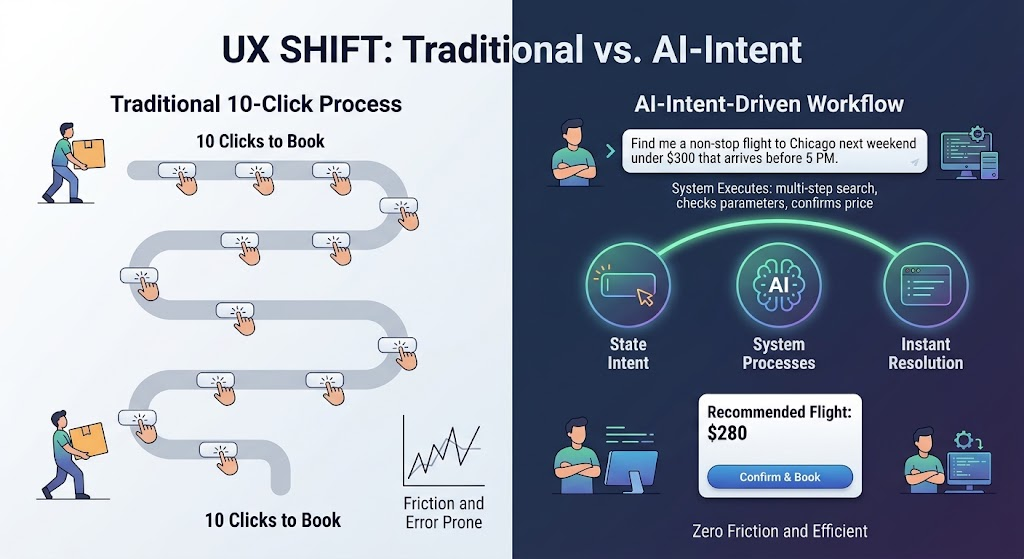
This is a classic point-and-click UI paradigm. The computer acts as a passive container of data, and the human acts as the orchestrator, manually inputting parameters, interpreting raw outputs, and executing each micro-step along the way.
Intent-driven design flips this dynamic entirely. Instead of forcing you to navigate the mechanical steps of how to find a flight, the interface asks a simple question: What are you trying to accomplish?
When you express a goal, such as “Find me a non-stop flight to Chicago next weekend under $300 that arrives before 5 PM”, the software reads your intent, executes the multi-step search query behind the scenes, compares the options, and presents a single actionable resolution. The ten clicks dissolve into one clear intent outcome.
This shift isn’t a theoretical vision of the distant future. Some of the world’s most accessible websites allow you to experience intent-capturing systems already.
1. Perplexity AI: Search Without The Open Tabs
Traditional search engines like Google were built as directories. You typed a keyword, and the interface rewarded you with ten blue links. The actual work of opening five tabs, skimming long articles, dodging ads, and manually assembling an answer was left to you. Although this is now changing, with AI content appearing first when you search on Google.
Perplexity AI allows anyone to perform instant intent-based searches. Instead of forcing you to click into multiple tabs, the interface synthesises the perfect result for your context.
- The interaction: You ask a complex question in plain English: “Compare the top three budget laptops for a computer science student, focusing on battery life and keyboard quality.”
- The invisible work: In under two seconds, the platform searches the web, reads dozens of articles, evaluates hardware specifications, and cross-references user reviews.
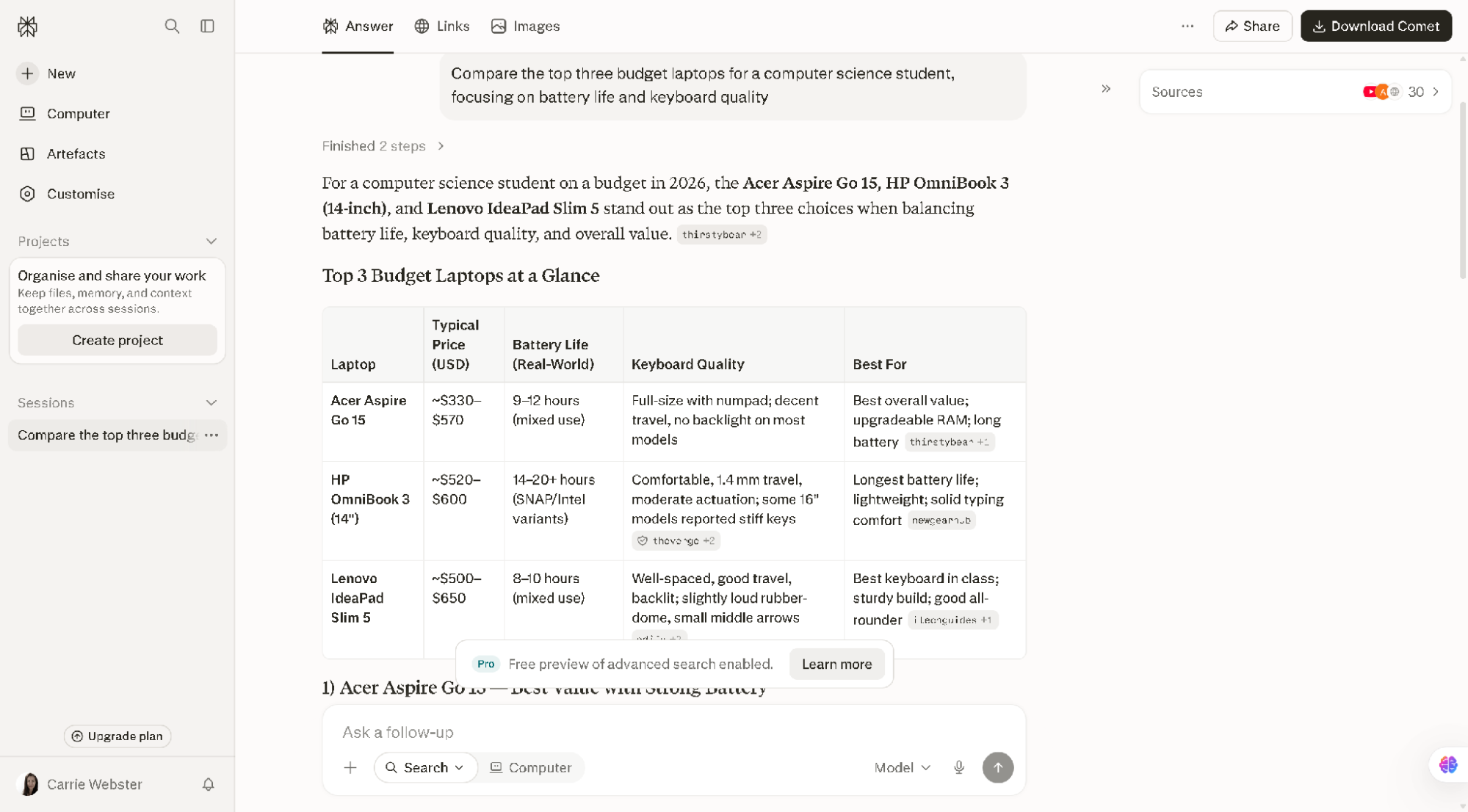
- The result: (See screen above) Instead of throwing web pages at you, Perplexity dynamically generates a single custom answer complete with formatted comparison tables, pros and cons lists, and concise inline citations. You get the outcome of thirty clicks in just one.
2. Vercel v0: Web Design Without Dragging And Dropping
For years, creating a website meant using visual builders like Figma or drag-and-drop web editors. As designers, we spent hours manually drawing rectangles, picking hexadecimal colour codes, adjusting padding values, and sometimes writing CSS code.
Vercel v0 lets anyone test its generative interface builder right from the home page without signing in.
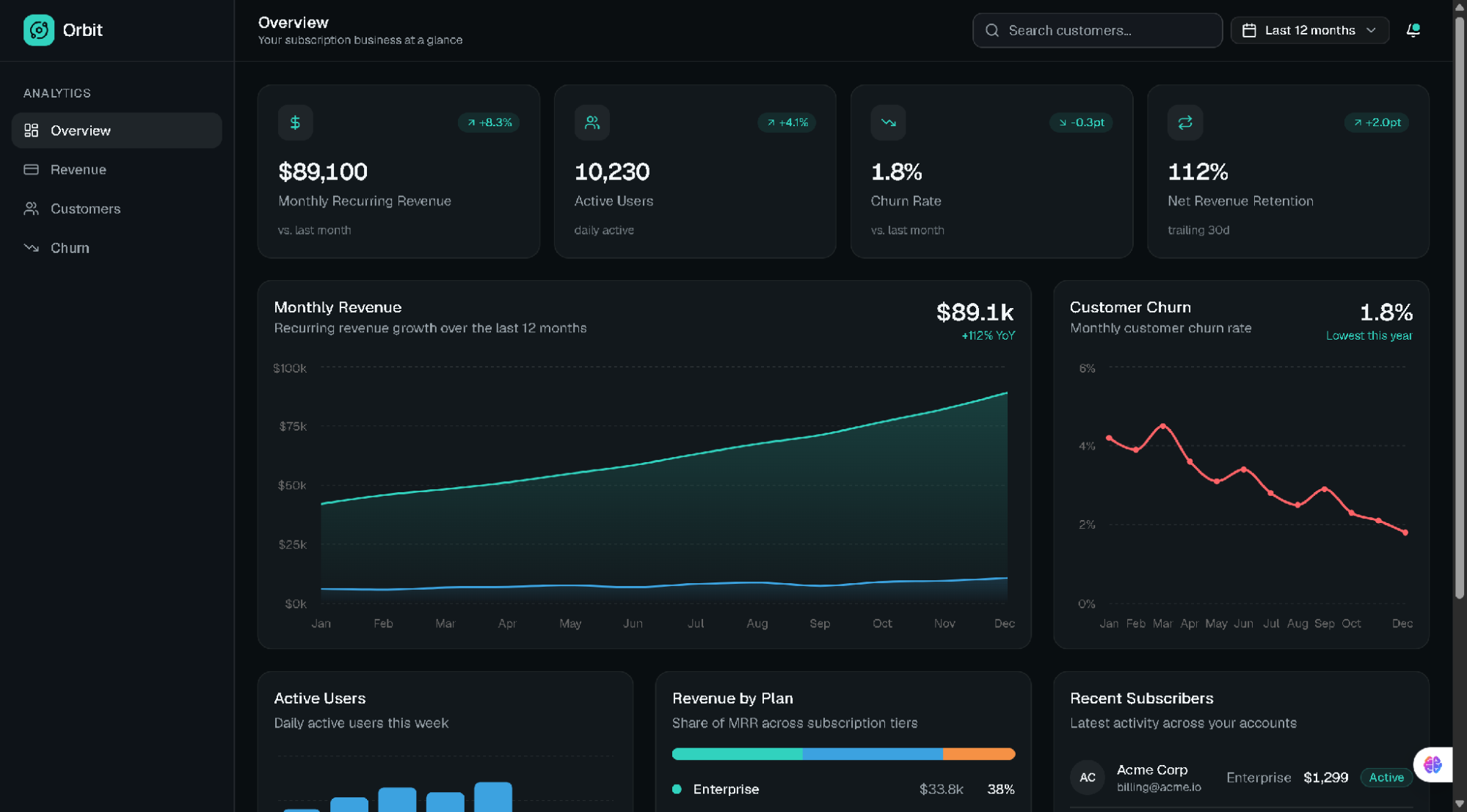
- The Interaction: A user types a descriptive goal into the input prompt: “Create a modern dark-mode dashboard for a subscription SaaS app showing monthly revenue, active users, and a customer churn chart.”
- The invisible work: The underlying AI understands layout principles, accessibility guidelines, UI component libraries, and responsiveness. It writes clean HTML, Tailwind CSS, and React code in real time.
- The result: Rather than spending an afternoon manipulating elements, the user receives a fully functional, pixel-perfect user interface in seconds! The traditional visual design tool disappears, replaced by raw human intent.
3. Goblin.tools: Breaking Down Overwhelming Tasks
Many traditional productivity tools require you to manually construct task lists, drag items across Kanban boards, and assign micro-deadlines. Goblin.tools is a free, single-page suite of single-task AI tools designed specifically for neurodivergent users or anyone feeling overwhelmed, requiring zero sign-ups or configuration.
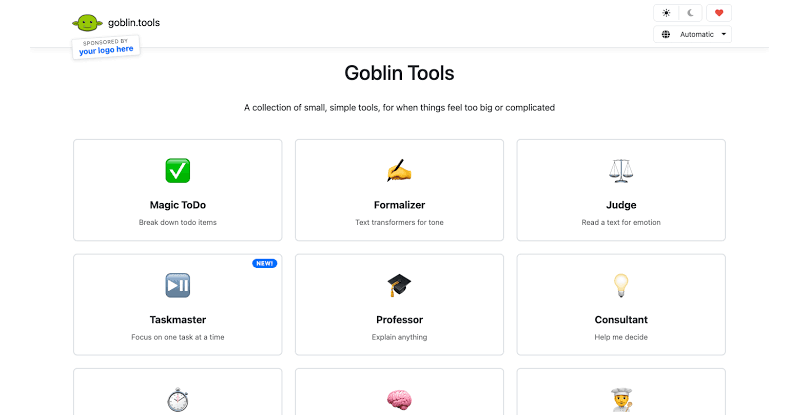
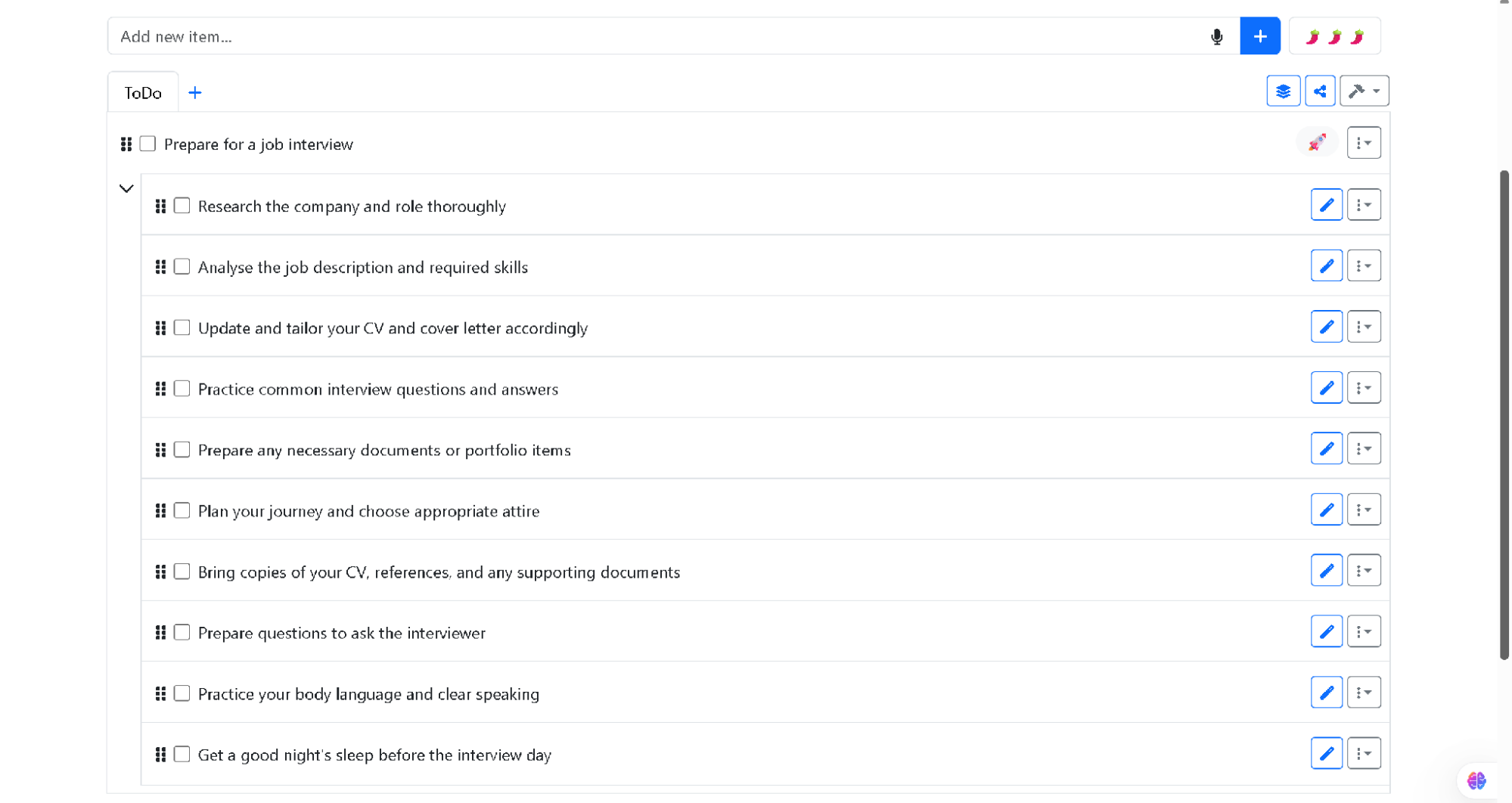
- The interaction: You enter a vague, intimidating goal into the Magic Todo tool, such as “Prepare for a job interview”.
- The invisible work: Instead of forcing you to plan every step, the system analyses the cognitive load of the goal and automatically breaks it down into small, actionable sub-tasks adjusted to your preferred level of detail.
- The result: The interface eliminates the stressful task-planning phase and presents a clean checklist tailored to your exact goal.
When you remove traditional menus, sidebars, and forms, how do you keep a website usable? Designers pioneering this space rely on three core pillars:
| Pillar | Traditional UX approach | Intent-driven UX approach |
|---|---|---|
| User input | Micro-actions (Clicks, dropdowns, toggles) | 1. High-level goals (Natural language, context, habits) |
| Interface state | Static layouts (Everyone sees the same page) | 2. Generative UI (Layouts created dynamically on the fly) |
| Task execution | Manual execution by the user | 3. Autonomous execution by background AI agents |
1. High-level Goals
An invisible interface doesn’t always wait for you to type a command — it leverages context to anticipate user needs. Guided by industry standards like Apple’s Human Interface Guidelines on Contextual & Ambient Design, modern systems read environmental metadata, such as device state, location, and past interaction patterns, to trigger proactive actions.
For example:
- Time and location: A food delivery web app prioritising your saved home address and dinner items automatically at 6:30 PM on a weekday.
- Cross-app history: A calendar application noticing an email about an upcoming appointment and surfacing a one-click “Add to Schedule” card without forcing you to copy and paste event details manually.
2. Generative UI
In traditional web design, every user sees the exact same layout. An e-commerce store shows the same navigation bar whether you are a first-time visitor looking for customer support or a returning customer tracking a package.
As highlighted in the Nielsen Norman Group’s analysis on AI as a new UX paradigm, computing is shifting from command-based interaction to outcome-specification. This enables Generative UI, where interfaces are rendered dynamically on the fly based on what you are trying to do in that exact moment. For example, platforms like Vercel v0 demonstrate how raw intent can instantly render functional code components without manual layout building. If you express a desire to compute complex financial data, the interface generates a dynamic calculator widget on demand, receding once your goal is completed.
3. Execution by AI Agents
Traditional interfaces are obsessed with prevention, constantly peppering users with confirmation pop-ups (“Are you sure you want to delete this file?”).
Intent-driven interfaces adapt Jakob Nielsen’s 10 Usability Heuristics on User Control and Error Recovery by shifting the safety net from prevention to easy reversibility. Because autonomous agents take actions on your behalf, products prioritise frictionless rollback mechanisms. A prominent “Undo” button, simple revision prompts (“Make this summary shorter”), and transparent audit logs replace intrusive warning modals.
The Hidden Risks
While removing interface friction is liberating, stripping away visual controls introduces significant product design challenges. When software acts on inferred intent rather than direct point-and-click commands, designers must navigate critical ethical and technical pitfalls.
The Illusion Of Control
When a website makes decisions for you, it can quickly feel patronising or invasive. As explored by the Stanford Human-Computer Interaction (HCI) Group, automation must maintain clear boundaries to prevent user frustration. Furthermore, ethical frameworks from the Center for Humane Technology emphasise that product designers must guard against manipulative defaults.
Designers must strike a delicate balance: automate routine execution, but explicitly prompt the user for high-stakes confirmations (such as financial transactions, publishing public content, or altering privacy settings).
The Black Box Problem
In a traditional UI, if you get an unexpected result, you can usually diagnose the issue — perhaps you checked the wrong filter box or selected an incorrect date.
With an intent-driven interface, troubleshooting becomes harder. To address this “black box” challenge, the Google PAIR (People + AI Research) Guidebook advocates for transparent feedback loops. The system must explicitly state its interpretation (“Searching for non-stop flights to Chicago under $300...”) so users can calibrate trust and correct misinterpretations instantly.
From A UX Perspective
As a UX designer, always being curious to understand how our design approach is changing in the world of AI, I find it essential that we re-evaluate the foundational elements of our craft.
Rather than designing static buttons and rigid forms, we need to learn to map and present dynamic, generative UI components that adapt on the fly to user intent.
By mastering these evolving patterns, like ambient feedback, inline prompts, and transparent AI status indicators, we can ensure that screenless, agent-driven tools remain intuitive, ethical, and deeply human-centered.
ConclusionThe ultimate goal: The best design is no design.
For decades, the digital industry has evaluated software success through engagement metrics like time spent in app, click-through rates, and page views per session. Websites were deliberately engineered to maximise visual engagement and interaction volume.
The philosophy behind Golden Krishna’s seminal book The Best Interface Is No Interface, aligned with the broader Center for Humane Technology’s Time Well Spent movement, turns these metrics on their head. The ultimate test of a modern digital product is no longer how visually captivating its buttons are, but rather: How effectively did this software solve the problem and get out of the user’s way?,
We are entering an era where web applications will no longer be measured by the beauty of their interfaces, but by their ability to render those complex interfaces completely obsolete. The future of the web isn’t more interaction — it is seamless, invisible completion.